
Link Storage

Procore
Sync and share your Procore documents
Link Procore
Sync your Procore company and project documents on Mac, Windows, and Linux
Why Odrive?
Get your users and everyone they work with sync for their files in Procore. We are
an official and preferred partner of Procore. We make your document workflows more efficient by allowing you to work
straight out of Windows Explorer or Mac Finder. Save time, improve productivity, and prevent costly mistakes by
streamlining your document workflows. With Odrive, you'll get more value out of your existing Procore investment
and be able to accelerate adoption of Procore within your organization.
Watch the short video below to see how to sign in using your Procore credentials and start your free 30-day trial. You'll also want to contact sales@odrive.com to start a conversation about your company's needs or to request a demo.
Watch the short video below to see how to sign in using your Procore credentials and start your free 30-day trial. You'll also want to contact sales@odrive.com to start a conversation about your company's needs or to request a demo.
What Customers are Saying
"For accessing Procore Documents locally from our computers, Odrive was exactly what we needed. The Odrive team is solution-oriented
and go the extra mile when necessary. I'm really happy to collaborate with them for our document storage needs."
Christine Larue
Project Manager - Special Projects
Pomerleau, Inc.
Christine Larue
Project Manager - Special Projects
Pomerleau, Inc.

"Odrive has been a huge time saver for our MEP coordinators, keeping our subcontractor files updated and available. The most
important thing has been how easily our team has been able to get up and running. They sign in, download the
app and have all their Procore Documents available."
Christopher O'Neil, RA
Director of VDC
Lee Kennedy Company
Christopher O'Neil, RA
Director of VDC
Lee Kennedy Company

"Odrive was the key solution for allowing our engineers to be able to use .xref files in AutoCAD. Their customer service is AMAZING!
We really appreciate the effort the Odrive team makes to meet our needs as a company."
Arielle B.
Operations Coordinator
CML Security
Arielle B.
Operations Coordinator
CML Security

"The integration with Procore has been seamless and smooth. Odrive has also been quicker with syncing and opening files than our
previous solution was. Overall, we are very pleased with our switch from Procore Sync to Odrive."
Rusty M.
Project Executive
Graycor
Rusty M.
Project Executive
Graycor

"We have a shared drive for our internal teams as well as for outside contractors and owners. Odrive gives us
instantaneous access and allows us to work on Project files right from the desktop -- saves us tons of time!"
Angela Scoggins
Senior Project Accountant
L. Keeley Construction
Angela Scoggins
Senior Project Accountant
L. Keeley Construction

"We pride ourselves in using our technology systems efficiently. Odrive helps us by making documents flow seamlessly between our
ERP system, Docusign, and Procore."
Lee Farrell
Systems Analyst
MAPP
Lee Farrell
Systems Analyst
MAPP

"While transitioning to web-based storage, we wanted to maintain our desktop workflows, syncing to the cloud without wasting time using
web apps. Odrive separated itself from the pack with very intuitive navigation, helpful customer service, and awesome features. Odrive
has exceeded our expectations. It was extremely easy to roll out and train our team on how to use it. The system works exactly how we
hoped; making file access fast, seamless, and accurate. Thanks for the great product!"
Jackson Chastain
Project Manager
ELCCO Electric
Jackson Chastain
Project Manager
ELCCO Electric

"Kilcawley Construction implemented Procore and then wanted to improve user interaction with the Documents tool. Procore
suggested Odrive as a recommended partner. With Odrive, we have significantly improved workflow efficiencies.
Key capabilities include: efficient and reliable desktop sync, ability to minimize storage consumption on devices, and
flexible file sharing options for internal and external stakeholders."
Brendan Henry
Director
Kilcawley Construction
Brendan Henry
Director
Kilcawley Construction

"Using Odrive has helped us get even bigger gains from our investment in Procore. Our teams save invaluable time because they're not
manually uploading files through the web, working on old versions, or juggling multiple copies of files."
Dylan Panebianco
Project Manager
Boyle Construction, Inc.
Dylan Panebianco
Project Manager
Boyle Construction, Inc.

Sign in with your Procore account
No need to create new accounts. Users can sign in using their Procore credentials
to get started right away.
Access company and project documents
Once you've linked your Procore account, you'll be able to interact with your company and project documents directly
through Mac Finder, Windows Explorer, or via command line on Linux.
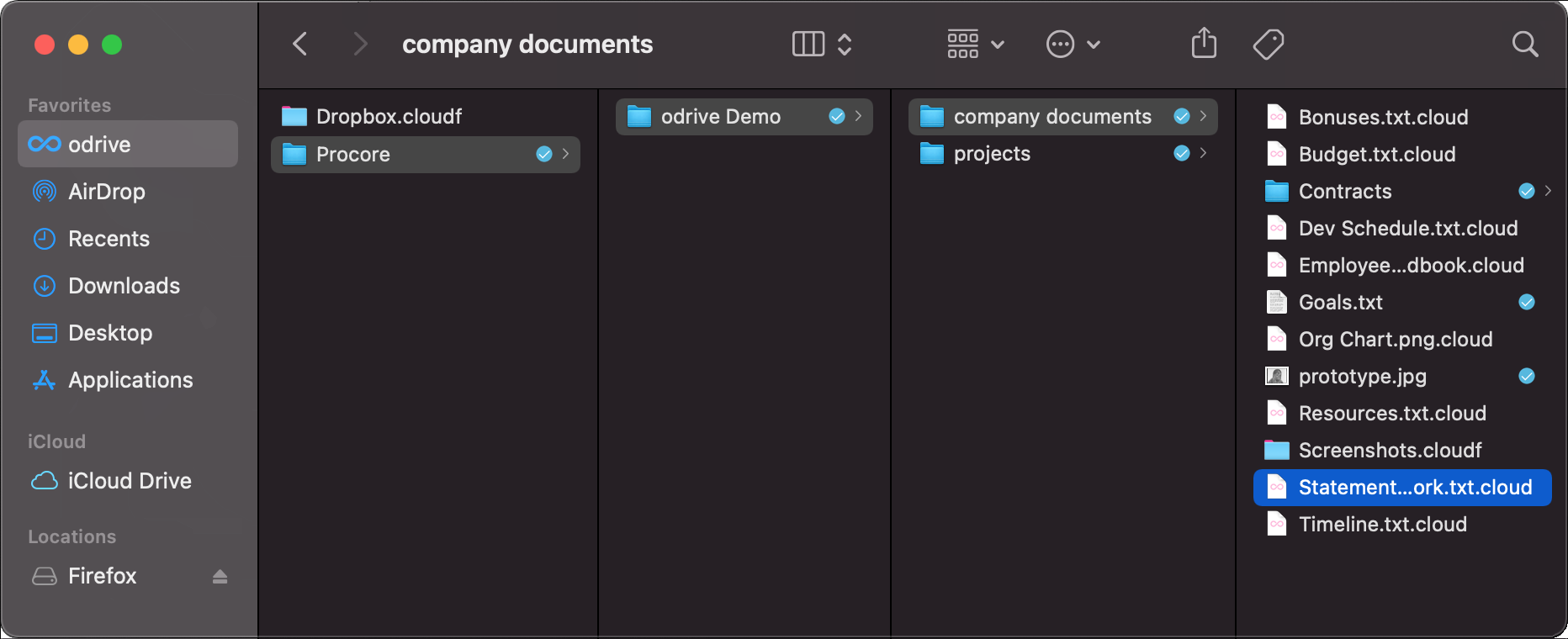
Keep existing permissions defined in Procore
All existing Procore-level permissions are obeyed, so it's safe and easy to try out Odrive. There's
no need to worry about opening up any security holes or spending a lot of extra time on initial configuration.
Sync for all storage
If your company uses other storage (such as Autodesk, SharePoint, and more), users can link it to the sync app, too,
giving them one place to access all of their files.
We also provide other solutions to bridge the data between Procore and your file server or other storage. Inquire with our sales team at sales@odrive.com about any complex storage requirements you may have.
We also provide other solutions to bridge the data between Procore and your file server or other storage. Inquire with our sales team at sales@odrive.com about any complex storage requirements you may have.
Share files with anyone
Weblinks: your users can share documents in Procore even with people that aren't in your Procore account by sending them a secure
weblink. Add a password or expiration date to further safeguard your data.
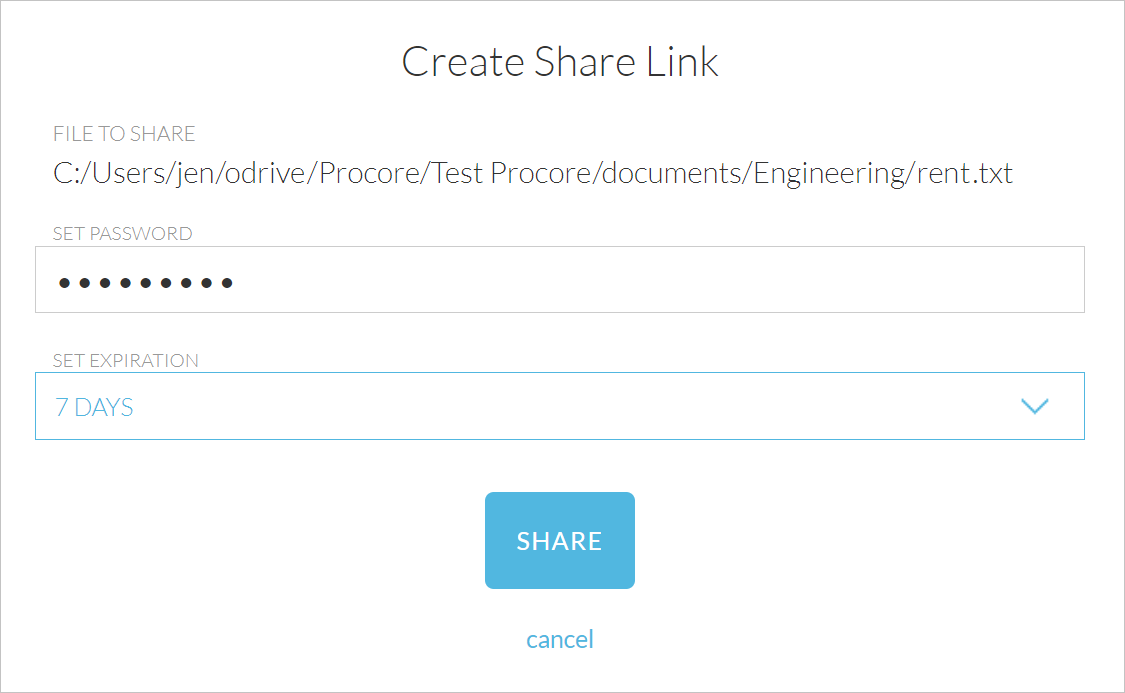
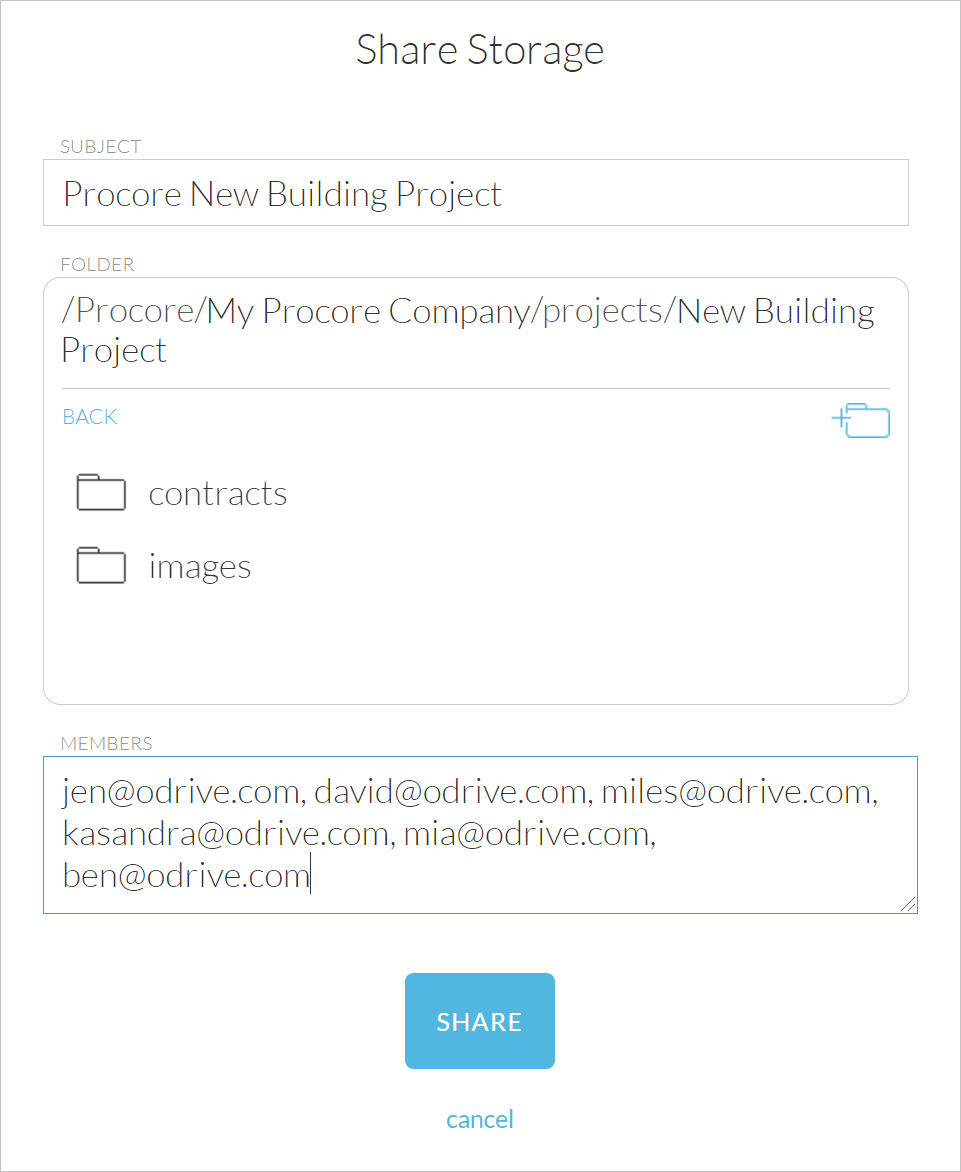
Enable collaborative sharing
Spaces: create an Odrive Space for a team to share a specific folder in your Procore account collaboratively. Invited space
members will see the Space in their own Odrive folders and can sync with it just like any other storage they've linked to their Odrive account.
Once your project is over, you can remove anyone from the Space to revoke access to it.
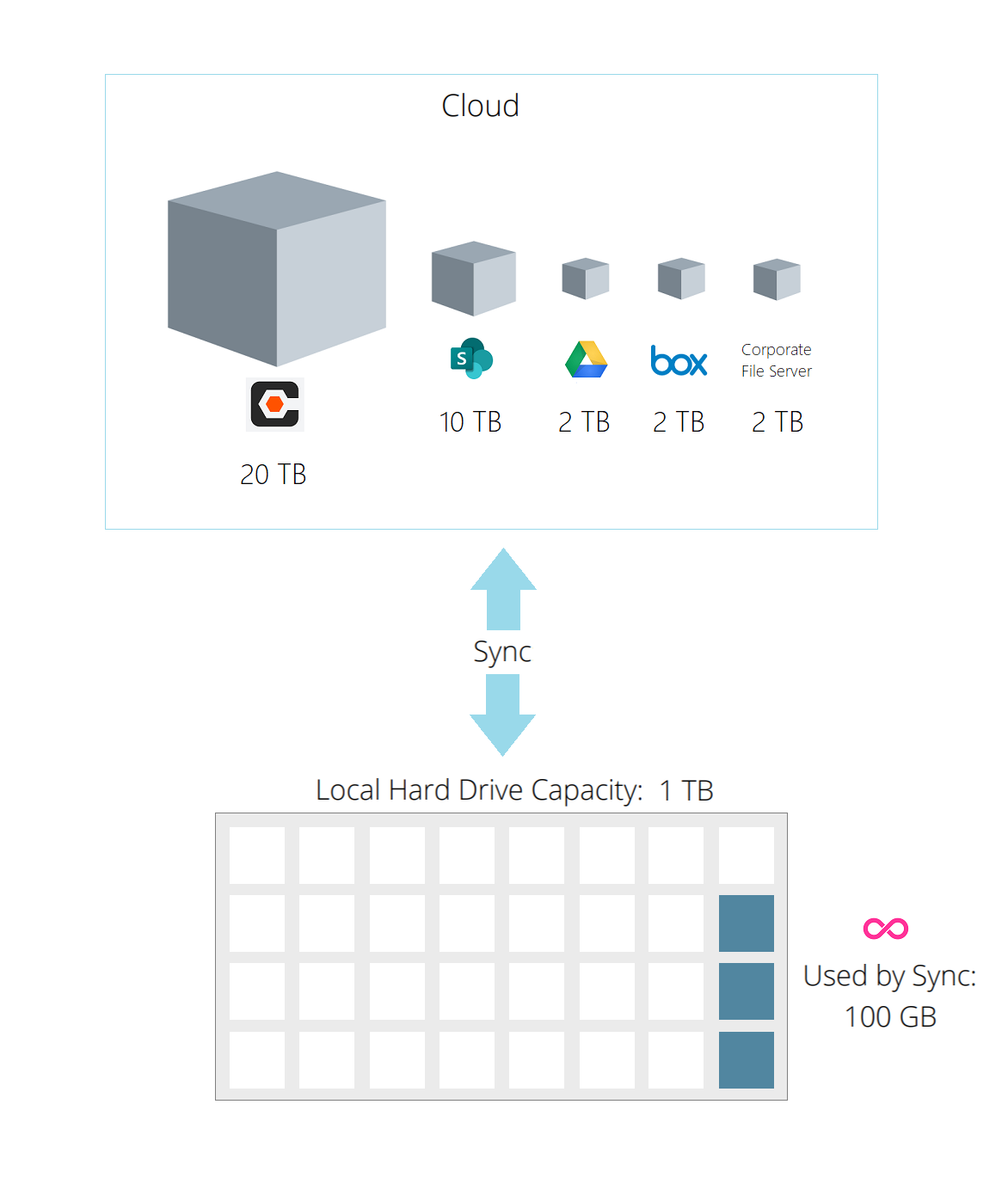
Save disk space and bandwidth
Placeholder files allow users to see everything in the cloud without downloading any files until they need it. Save valuable disk
space and bandwidth for users on the move or working on a job site.
Ready to try Odrive?
Click on the button below to get started today! Or request a demo from our sales team by contacting
sales@odrive.com. We'd love to hear from you.
FAQ
How can Odrive help me roll out the Documents tool to my users?
See this information sheet
to learn more about how you can accelerate adoption of the Documents tool in your organization with Odrive.
How do I get started with Odrive for Procore?
We have a streamlined Procore solutions page with
a step-by-step overview of how to quickly sign up and get started.
Can I sign up to Odrive using my Procore account?
Yes. Procore is supported as an sign-in provider. It is often the most straightforward choice to just sign up using your Procore credentials.
If necessary, you can use a different sign-in provider and connect your Procore account as a linked storage source to get access to your Procore documents. See this documentation page for more information.
Do you have any best practices or recommendations for rolling Odrive out to my Procore users?
If necessary, you can use a different sign-in provider and connect your Procore account as a linked storage source to get access to your Procore documents. See this documentation page for more information.
Our
best practices guide is available as a resource for you to help you with your initial rollout.
Can I link multiple Procore accounts?
Yes, you can link as many Procore accounts and other storage accounts
(e.g. Dropbox, Box, OneDrive, SharePoint, and more) as desired.
Is Odrive secure? How does Odrive interact with Procore?
See this information sheet
for answers to some common security questions regarding Odrive's integration with Procore.
What Documents tool permissions are used when I access my files?
Your Procore user's permissions are enforced at both the Documents Tool access level and the specific file or folder permission level (set using the
"Make Private" checkbox). See our
documentation page for more information.
Can odrive help me migrate data from older repositories into the Documents tool on Procore?
Yes, you can link other storage types to your Odrive account so you can
facilitate moving data from one system to another. However, we believe that Odrive can help you
skip migration entirely
if you leverage our multicloud access capabilities for your users. This can help reduce risk and costs while letting your roll out Documents tool
more quickly into your organization.
How do I purchase Odrive Premium for my Procore users?
Speak with a sales representative by contacting sales@odrive.com. You'll be able to ask
any questions during your free 30-day trial. A business subscription plan is required to use Premium features with Odrive. See our
business subscription documentation page
for more information.
How do I get help with issues while using Odrive to access my Procore files?
The fastest way to get help is to send an email to support@odrive.com with a description
of what you're seeing. Our client support team will respond quickly to your incoming request.
 my odrive